

You find a job you want to apply for, open your CV, and start wondering what to change. Which experience should you highlight? Does your personal profile explain why you would be good at this role? How much do you need to rewrite before you can hit submit?
Claude can help you work through those decisions. Give it your CV and the full job description, then ask it to identify the experience worth highlighting before it rewrites anything.
Below, you'll find copyable prompts, a worked example, and checks for the finished document. If you would rather handle the rewriting and formatting together, Reztune's CV tailoring tool offers that workflow in one place.
To get started in Claude, attach your CV, paste the job description, and add this prompt:
Compare my CV with this job description. Identify the most important requirements, find evidence for each in my background, and ask me about anything unclear. Do not rewrite yet or assume I have skills that only appear in the job description.
What to Give Claude Before It Rewrites Your CV
Open a new Claude conversation for the application. Upload your CV or paste its text, then provide the full job description with a clear label. Claude supports document uploads; check its file upload guidance if you have trouble attaching yours.
Include these three things:
- Your current CV. Keep employer names, dates, titles, and qualifications accurate.
- The job advert and person specification. Include the responsibilities and any separate essential and desirable criteria, not just the job title.
- Relevant details missing from your CV. Projects, tools, scope, and results you can explain confidently in an interview.
That third input often makes the biggest difference. Your CV might say “maintained data pipelines,” while you remember diagnosing failed event deliveries and writing the recovery procedure. Claude needs those details to make the work specific.
If you are starting from scratch, supply career notes instead: each job, its dates, your responsibilities, projects, education, and skills. Ask Claude to organise the facts and identify gaps before writing a CV. You do not need polished sentences to get started. For a UK application, include relevant qualifications under Education using their actual names. If the employer asks for a separate supporting statement, treat that as its own task: a tailored CV does not replace answers to the application criteria.
Why the Job Description Matters More Than the Title
Two companies advertising for a data engineer may want very different things. One needs SQL reporting and dashboards. Another needs streaming pipelines, monitoring, and incident response.
A prompt like “make me a great data engineer CV” leaves too much open. You want the version of your experience that makes sense for this particular opening. The same applies outside tech: one marketing role might focus on creating content, while another needs someone to run paid campaigns.
The person reading your CV may not know your specialism. Help them connect your experience to the work they need done, without having to decode your old job title.
Throughout this guide, we will use Alex, a fictional candidate, to show how that works. The examples are illustrations, not a recorded Claude test.
| Alex's source information | What we know |
|---|---|
| Experience | Three years as a data engineer |
| Batch work | Built Python and SQL pipelines for daily reporting |
| Streaming work | Maintained Kafka ingestion for application events |
| Reliability work | Investigated failed deliveries, added alerts, and documented recovery steps |
| Collaboration | Worked with application engineers on incident troubleshooting |
| Limits | No verified performance metrics and no evidence of owning platform architecture |
The target advert asks for Kafka, Python, monitoring, incident troubleshooting, and collaboration with application engineers. It also lists Kubernetes as desirable. Alex has not provided Kubernetes experience.
You do not need to know those tools to follow the example. The key distinction is between preparing daily reports and keeping a continuous flow of data running reliably. This employer needs the second, and Alex has experience worth bringing forward.
A Claude CV Prompt You Can Copy
Use this fuller prompt when you are ready to work through an application. Replace the bracketed sections with your information.
Help me tailor my CV to a specific job. Make my relevant experience easy for a recruiter to recognise, using plain, professional language.
My CV:Paste your CV, or identify the attached file.
Job description:Paste the complete advert.
Additional verified background:Add relevant projects, responsibilities, tools, and results missing from the CV. Write “none” if there are no additions.
First, analyse before rewriting:
- Identify the role's main responsibilities and distinguish essential from desirable criteria. Include any separate person specification I provide.
- Make a table with the requirement, evidence from my background, and any missing or unclear information.
- Ask me the questions that would materially improve the CV. Wait for my answers before drafting. If no clarification is needed, say so and ask me to approve the analysis.
After I answer or approve the analysis: 4. Rewrite my personal profile, organise my skills, and tailor the relevant experience bullets to this advert. 5. Prioritise the experience that demonstrates fit. Preserve accurate employment history and qualifications. 6. Use terminology from the advert where it describes work I actually did. Do not add unsupported skills, numbers, certifications, responsibilities, or seniority. 7. Keep the wording specific and readable. Avoid filler such as “visionary,” “dynamic,” and “results-driven.” 8. Finish with a short change log explaining what you emphasised, what you shortened, and what requirements remain unsupported.
Save this as your base prompt. For the next application, replace the advert and keep your career facts consistent.
The value comes from the sequence: analyse, clarify, then rewrite. If you also use ChatGPT, our guide to tailoring with ChatGPT covers a similar approach in that assistant.
How to Tailor Your CV With Claude, Step by Step
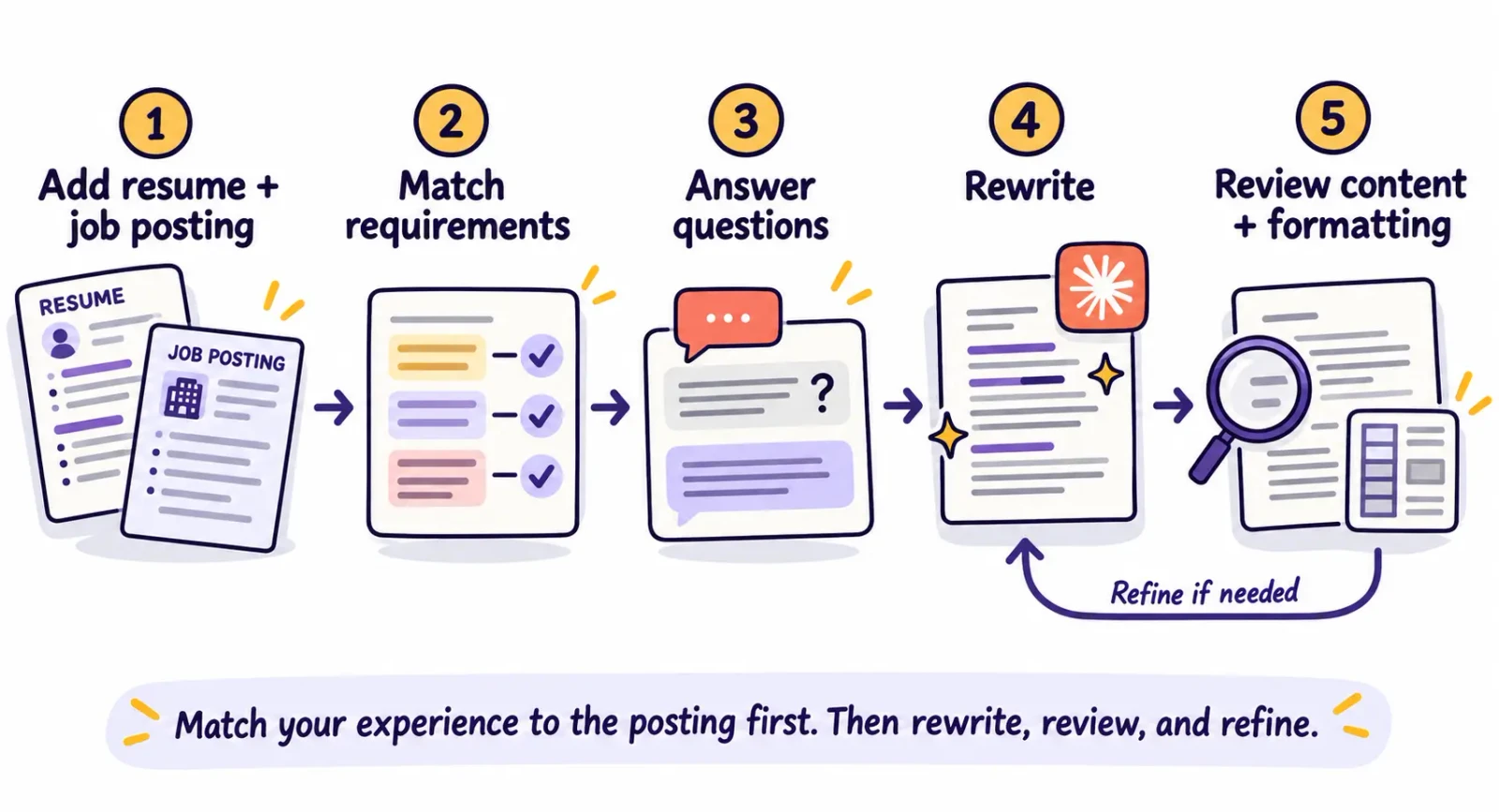
1. Check Which Requirements It Prioritises
Read the requirement table before accepting a rewrite. Has Claude picked out the work the employer actually needs done, or simply collected every technical term in the advert?
For Alex, a useful analysis would look like this:
| Job requirement | Evidence available | Next action |
|---|---|---|
| Kafka ingestion | Maintained ingestion for application events | Make this visible in the personal profile and experience |
| Python | Built reporting pipelines in Python | Keep the skill and its supporting work |
| Monitoring and troubleshooting | Added alerts and investigated failed deliveries | Explain the actions in a specific bullet |
| Work with application engineers | Collaborated on incident troubleshooting | Include the collaboration in context |
| Kubernetes desirable | No supplied evidence | Leave it out; ask whether relevant experience exists |
Missing evidence is useful information. It tells you what to clarify or leave alone. Adding Kubernetes because the employer mentions it would make the CV less trustworthy.
2. Answer Questions With Details, Not Adjectives
Suppose Claude asks how you improved reliability. “I was proactive and detail-oriented” gives it very little to work with.
“I added alerts for failed deliveries, investigated incidents with the application team, and wrote recovery steps” gives it three concrete actions.
You do not need a percentage for every bullet. A clear description of the problem, your action, and the scope is useful even when you cannot measure the result. If you remember a number but cannot substantiate it, leave it out until you can.
3. Rewrite the Sections That Carry the Match
Ask Claude to start with the personal profile and the most relevant experience. Then review the skills section against the evidence in those bullets.
For Alex's streaming-focused application, Kafka and incident troubleshooting should get attention early. Daily reporting still belongs in the CV, but it does not need to lead the story.
Keep jobs in a clear chronological order. Within a job, reorder bullets to bring the strongest evidence forward. You are making the reader's job easier, not hiding where or when you did the work.
4. Fix Specific Problems With Follow-Up Prompts
If the draft sounds generic, explain what needs changing. “Make it better” can produce another round of polished filler.
To remove vague wording:
Replace vague claims in these bullets with specific actions supported by my source information. Remove any sentence that says I am good at something without showing what I did.
To recover useful experience:
Compare this draft with my original CV and additional notes. Did you remove any evidence relevant to the advert? List it and recommend where to restore it without making the CV repetitive.
To keep your level of responsibility accurate:
Check every claim of ownership or leadership. Distinguish work I contributed to, maintained, and led. Ask me if the source information does not establish which description is accurate.
Once a section works, tell Claude to preserve it while revising the next one. Otherwise, you can end up fixing one bullet while an already-good personal profile changes again.
5. Make the Process Easy to Repeat
Keep your base CV, career notes, and saved prompt together. Start each application from those facts, rather than from the last tailored version: that version may have removed experience the next employer wants to see.
Our advice is to apply early, ideally within 48 hours of a suitable opening appearing, and always tailor your CV. That is a practical target, not a cut-off that makes older adverts pointless. Having your materials ready helps you act promptly without rushing out a generic application.
Give yourself a stopping point, too. Once the important requirements are addressed, the claims are accurate, and the document reads cleanly, another round of synonym changes is unlikely to be your best use of time. Save the finished file with the company and role in its name so you can find it before an interview.
Before and After: Tailoring Alex's CV
Here is how the same background can become more relevant without gaining any new accomplishments.
The Personal Profile
Before:
Data engineer with three years of experience working with data pipelines, reports, and teams across the business. Looking for an opportunity to solve challenging problems.
Tailored to the advert:
Data engineer with three years of experience building Python and SQL pipelines and maintaining Kafka ingestion. Hands-on experience investigating failed event deliveries, adding alerts, and working with application engineers on incident troubleshooting.
The revised version makes the match visible. A recruiter can identify the tools and responsibilities the employer requested without interpreting “challenging problems.”
The Experience Bullet
Before:
Worked on data pipelines and helped resolve issues.
An overstated rewrite to reject:
Architected a fault-tolerant streaming platform that eliminated delivery failures and improved uptime by 40%.
That sounds impressive, but our source facts do not support architecture ownership, eliminated failures, or the number.
A grounded version:
Maintained Kafka ingestion for application events, investigated failed deliveries with application engineers, and added alerts and recovery documentation.
The grounded version still sells the experience. It names the system, the problem, the collaboration, and the work Alex performed. Those are details Alex can discuss in an interview.
The Skills Section
For this advert, Alex could lead with Kafka and Python, followed by SQL, pipeline monitoring, and incident troubleshooting. Kubernetes stays out unless Alex supplies real experience with it.
For a reporting-focused advert, SQL and batch pipelines might come first instead. This is the practical advantage of tailoring: a different emphasis for a different job, built from the same background.
Turn the Draft Into a CV That Reads and Parses Cleanly
This is the part people underestimate. You finally have wording you like, then spend another evening fixing line breaks, squeezing bullets onto a page, and moving headings that refuse to stay with the right job.
A downloadable PDF is not proof that your CV is formatted properly. The text needs a sensible reading order, and the layout needs to make your experience easy to scan.
Claude supports creating Word and PDF files. If you use that capability, request the layout explicitly and inspect the exported file. File generation and CV-specific quality control are separate steps.
Formatting problems are real: Greenhouse documents CV parsing issues involving columns, complex tables, graphics, and contact details placed in headers, footers, or text boxes. A file can look acceptable on screen while parts of its content import incorrectly.
Use this instruction when preparing the document:
Format the approved CV in a simple single-column layout with clear section headings and consistent spacing. Keep contact details in the main document body. Avoid decorative graphics, skill bars, and text boxes. Keep each job heading with its first bullet. Preserve the approved wording. Use A4 pages and British English. Do not shrink the text just to force the CV onto one page. Follow the file format requested by the employer.
Then check the result yourself:
- Open the exported file. Look for clipped text, tiny fonts, awkward spacing, and stranded headings.
- Select and copy the text into a plain-text editor. Check whether sections, dates, and bullets appear in a sensible order. This can reveal problems, though it is not a complete ATS compatibility test.
- Check the application form after uploading. If it fills fields automatically, confirm the employer names, titles, dates, and contact details.
- Read the top portion as a busy recruiter. Can you quickly see the experience that makes you relevant to this advert?
For a broader document review, use our ATS CV formatting checklist.
When Reztune Makes the Process Easier
Claude is useful when you want to work through the wording in conversation. You provide the instructions, answer questions, guide the edits, and check the layout. With saved prompts and a familiar template, you can make that process more efficient. It still takes attention each time the advert changes.
That is the problem we built Reztune around. Applying early with a relevant CV is straightforward advice; keeping it up through a long search is harder. Spending an evening on an application and hearing nothing can make the next one feel exhausting before you start.
Reztune brings those tasks into a dedicated CV workflow. You supply your CV and the job description, and it rewrites the content inside carefully designed, ATS-optimised templates. The built-in editor lets you review and adjust the result before downloading a PDF.
The formatting is part of the product. You get templates designed for parsing and human readability, rather than having to direct a fresh layout and troubleshoot it yourself. That means less time wrestling with margins and more time reviewing the experience you want an employer to notice.
The tailoring follows a structured sequence of prompts that uses the advert to decide what to emphasise, shorten, and rephrase. You can guide Claude through those decisions yourself, as this tutorial shows. Reztune packages that work into a repeatable process alongside the formatting.
You also get requirement-level feedback: fully met, partially met, and missing, summarised in a match score from 1–100. That score estimates alignment with the job description; it is not a hiring prediction. The useful part is seeing where your CV provides evidence and where you still have a gap to review.
It cannot take the disappointment out of a rejection. It can make preparing the next application less of a project. If formatting and repeated prompting are slowing you down, tailor your CV to the job description with Reztune and review the content and layout together.
Questions About Using Claude for Your CV
Can I Use Claude as a CV Builder From Scratch?
Yes. Give it your employment history, qualifications, projects, and skills, along with the target advert. Ask it to question missing details before drafting. Notes and rough bullet points are enough to start; you can refine the wording after the facts are organised.
What Is the Best Claude CV Prompt?
A useful prompt includes your actual background, the complete job description, and clear instructions to analyse before rewriting. Use the template above, then answer its questions. The extra context and review matter more than calling Claude an “expert recruiter.”
Can Claude Review My CV Against a Job Description?
Yes. Ask for a requirement-by-requirement comparison with evidence quoted from your CV. Review its findings yourself, especially when it marks something missing that you describe using different terminology.
Is Claude Better Than ChatGPT for CVs?
For a detailed breakdown, see our comparison of Claude, ChatGPT, and Gemini for CVs. Whichever assistant you choose, use the actual advert, supply enough background, and review both the wording and the finished file. Switching assistants cannot compensate for missing information.
Can Claude Make an ATS-Friendly PDF CV?
It can create a PDF, and you can request a simple CV layout. You still need to inspect the output and its text order. A file extension or an assurance in chat does not establish that a particular document will parse correctly. Use the document checks above, or a dedicated CV workflow with templates designed for the task.